
You have antivirus. You have a firewall. Maybe you have multifactor authentication too. Most organizations do. But having security tools in place and actually knowing where your vulnerabilities are, those are two very different things.
A vulnerability assessment is a structured scan of your IT environment. It checks your network, your computers, your servers, your Microsoft 365 setup, your Active Directory, and your public-facing systems against a database of known security weaknesses. The goal is straightforward: find the gaps before someone else does.
Most organizations that suffered a breach were not careless. They simply could not see what was wrong with their own environment, because no one had looked. That is the gap a vulnerability assessment is designed to close.
This article covers two things: the warning signs that your organization needs one and what a real assessment actually uncovered when we ran one for a client.
Five signs your organization needs a vulnerability assessment
These are not technical red flags that only an IT team would notice. They are questions any executive, board member, or organizational leader should be able to answer, and most cannot. If even one of these applies to you, it is worth paying attention.
How to know if you need a vulnerability assessment
1. Nobody is putting a vulnerability report on your desk
This one is simple. When was the last time you received a written report on your organization’s cybersecurity vulnerabilities? Not a verbal update from your IT team. Not a reassurance that everything is fine. An actual document showing what is exposed, what the risks are, and what is being done about them.
If you cannot remember the last time you saw one, or if the answer is never, then you are making decisions about organizational risk without knowing what your actual risks are. It does not matter how good your IT team is or how much you have invested in tools. Without a scan and a report, no one in your organization has visibility into where the real gaps are, and that includes the people accountable for managing them.
2. You rely on antivirus and firewalls but are not actually testing your environment
This is the most common pattern we see. An organization has invested in security tools, antivirus on every machine, a firewall at the perimeter, maybe endpoint detection, maybe multifactor authentication, and assumes that means they are covered.
Those tools matter. But they are protective layers, not diagnostic ones. They block threats as they arrive. They do not check whether your environment is configured correctly in the first place.
A vulnerability assessment looks at an entirely different set of problems. It checks whether your password policies are actually being enforced, whether your operating systems are still receiving security updates, and whether there is a setting inside your Microsoft 365 tenant that lets attackers bypass MFA entirely. None of those gaps will trigger an antivirus alert because they are not viruses. They are misconfigurations, and they require a scan that is specifically looking for them.
3. Your cyber insurance now requires vulnerability assessments you are not doing
Insurance providers are raising the bar on what they expect before they will renew your policy. Many policies now require documented evidence of an active vulnerability management program, not just a self-reported questionnaire, but proof that your organization is regularly scanning for and addressing security gaps.
If your renewal is approaching and you are not sure whether you meet the latest requirements, a vulnerability assessment gives you the documented scan results and remediation plan that insurers are looking for.
4. Your industry regulations require proof that you are managing cybersecurity risk
Healthcare, long-term care, financial services, education, and government organizations all carry regulatory obligations around data security. The specifics vary by framework, but the underlying requirement is consistent: you are expected to actively identify and manage cybersecurity risk and to be able to demonstrate that you are doing so.
A vulnerability assessment provides the kind of documented, prioritized risk evidence that compliance reporting requires. It is not a compliance audit in itself. It does not certify you against any specific regulation. But it gives you the data and documentation you need to show that you are actively managing your exposure.
Even outside regulated industries, the principle applies. If your organization holds sensitive data of any kind, whether that is client records, employee information, financial data, or proprietary business information, you have a responsibility to know where that data might be at risk.
5. Your IT environment has changed recently, introducing new vulnerabilities
Mergers, acquisitions, office relocations, cloud migrations, rapid hiring, and organizational restructuring all introduce new vulnerabilities. Systems get connected quickly. Permissions get duplicated. Admin accounts created during a transition get forgotten. Old infrastructure stays in place longer than intended because no one has time to audit it during the change.
These are exactly the conditions that create security gaps, not through negligence, but through the normal friction of organizational growth. A vulnerability assessment is the most efficient way to identify what came along with the change and what got left in an insecure state.
What a vulnerability assessment actually covers
Before we get into what an assessment actually finds, it helps to understand what it looks at. A comprehensive vulnerability assessment scans six areas of your IT environment:
- Internal network: your network topology, connected devices, open ports, and any unrecognized or rogue devices on your network.
- Computers and servers: operating system patch levels, software versions, antivirus status, password policies, screen lockout settings, and admin account usage on each machine.
- Active Directory: user accounts, login activity, domain admin usage, orphaned accounts from former employees, password complexity, and service accounts with passwords that never expire.
- Microsoft 365: MFA configuration, conditional access policies, email security, legacy authentication protocols, SharePoint sharing settings, and global admin account usage.
- External attack surface: your public IP address and internet-facing devices, including exposed admin ports, misconfigured VPNs, certificate issues, DNS misconfigurations, and open remote desktop ports.
- Domain and DNS: your domain registration and DNS configuration for misconfigurations or exposures.
The scan checks all six areas against a global database of known vulnerabilities and produces a detailed report with prioritized findings and specific remediation steps.
What a vulnerability assessment actually finds: a real example
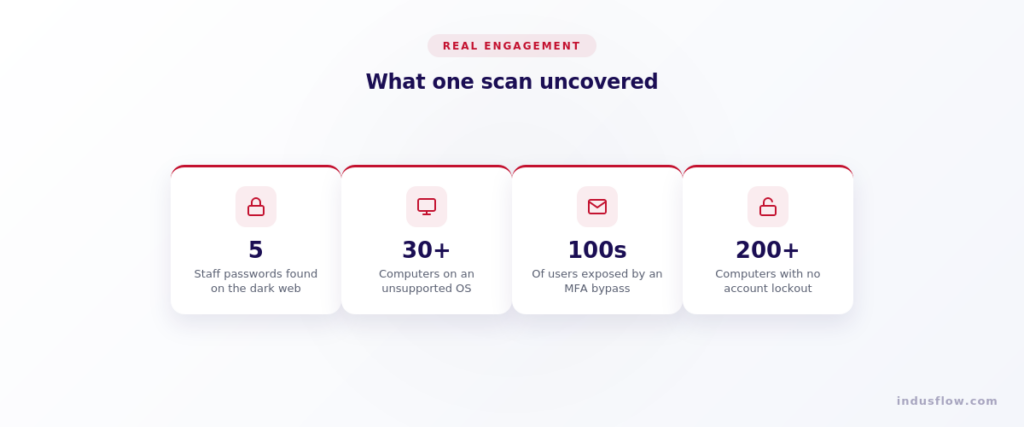
All of the above sounds useful in theory. But what does it actually look like when the results come back? To make this concrete, here is what happened when we ran an assessment for a long-term care organization in the Greater Toronto Area.
On paper, this organization was doing the right things. They had antivirus installed on their computers. They had a firewall in place. They had multifactor authentication switched on. By any reasonable measure, they looked like a well-protected organization.
Then we ran the scan. It came back with five significant findings.
1. Stolen staff passwords were already circulating on the dark web
Five staff email accounts were found with working passwords actively listed on the dark web. The most recent compromise had happened just weeks before we ran the scan. No alarm had gone off. No tool had flagged it. The organization had no idea.
If we had not specifically gone looking for compromised credentials, those passwords would have stayed out there indefinitely, available to anyone who wanted to use them to log in as a real employee.
2. More than thirty computers were running an operating system that no longer receives security updates
We found 32 computers still running Windows 10, which Microsoft no longer supports with security patches. Every one of those machines had antivirus installed and active. It made no difference. When the operating system itself is the vulnerability, antivirus has nothing to work with. There is no patch to apply, because Microsoft is no longer issuing one.
3. Outdated email protocols were creating a backdoor around multifactor authentication
The organization’s Microsoft 365 tenant was still allowing legacy email protocols, specifically IMAP and POP3, which are older methods of connecting to email that do not support multifactor authentication. This meant that even though MFA was turned on across the organization, an attacker could bypass it entirely by authenticating through one of these older protocols instead. This affected well over a hundred users, and it is not something any antivirus or firewall would ever detect. It is a configuration setting inside the M365 environment that has to be specifically found and corrected.
4. Account lockout was disabled on more than two hundred computers
On 219 computers, there was no account lockout policy in place. In practical terms, this means an attacker could attempt unlimited password guesses on any user account, on any of those machines, without ever being locked out. A brute force attack that would fail immediately on a properly configured network could succeed here because nothing was stopping it. The machines worked perfectly in day-to-day use. The vulnerability was completely invisible until someone started testing it.
5. Service accounts had passwords that were set to never expire
Finally, we found a number of service accounts, the behind-the-scenes logins that systems use to talk to each other, with passwords set to never expire. A permanent password is a permanent risk. If it is ever stolen, the door stays open indefinitely.
What these findings have in common
Look back at that list. Not one of those five problems was a virus. Not one was an active attack in progress. They were all quiet gaps: settings left at their defaults, protocols left enabled, and systems left running past their expiration date. They had accumulated over months and years without anyone noticing, because no one was looking.
This organization had antivirus. They had a firewall. They had MFA. They had invested in security and had every reason to believe they were protected. What they did not have was visibility, a clear, documented picture of where the actual risks were hiding.
That is what a vulnerability assessment provides. Not protection, and not remediation. Visibility. Once you can see the gaps, you can make informed decisions about what to address, in what order, and on what timeline. Without that visibility, you are not managing risk. You are hoping that what you cannot see does not find you first.
The takeaway
If any of the five warning signs earlier in this article describe your organization, it is worth taking a closer look at your environment. The gaps we found in this engagement were not unusual. Similar patterns show up consistently across the organizations we assess.
You can learn more about our vulnerability assessment service, including pricing, the full engagement process, and answers to common questions, on our vulnerability assessment page.
We also recorded a detailed video walkthrough on this topic, covering the cost, the process, what the report looks like, and the downsides. You can watch it below.